Yep, we may get a tiny thank-you (read: commission) when you buy through
links on Gadgetspotr — not enough for a yacht, but enough to keep the lights (and
servers) on.
Learn more
35
Highlights
60
Differences
6
Reactions
0
Likes
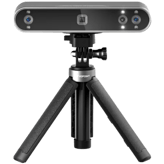
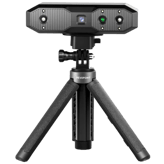
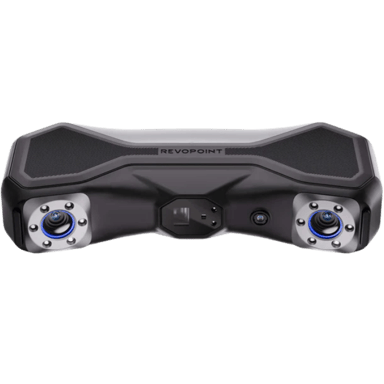
Revopoint MetroX
vs
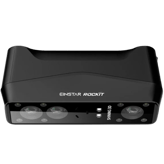
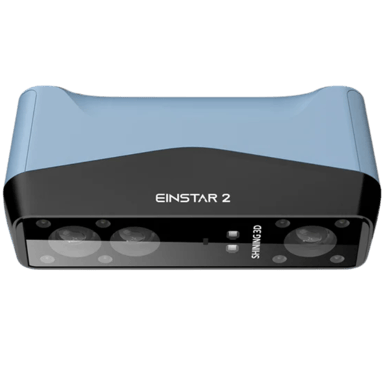
EINSTAR 2:
35 Highlights & 60 Differences —
Who Provides Better Scanning Precision?
Choosing a 3D scanner can be tough. Let's break down accuracy and performance for you.
We ran the full gadget test: Revopoint MetroX vs EINSTAR 2 — from scanner category, intended use, scanning method & frames per second to design smarts, here’s how they compare.
Revopoint MetroX vs. EINSTAR 2: A Deep Dive Into Two Advanced 3D Scanners
When it comes to cutting-edge 3D scanning devices tailored for prosumers and professionals alike, the Revopoint MetroX and EINSTAR 2 stand out for their overlap in purpose but distinct feature sets. Both scanners excel in providing highly detailed, accurate 3D captures suitable for reverse engineering and 3D printing workflows, offering real-time previews, texture mapping, and comprehensive mesh editing capabilities.
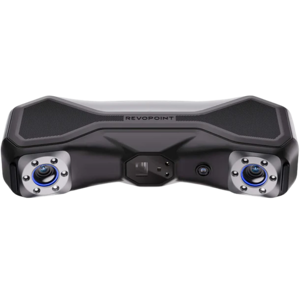
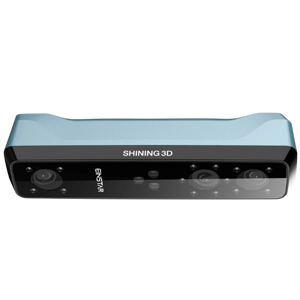
Yet, they diverge significantly in scanning technology, hardware design, and the size range of objects they accommodate. MetroX boasts a structured light system with dual cameras that delivers quick single scans at just 0.03 seconds and supports outdoor use with an aluminum chassis, while EINSTAR 2 employs laser triangulation with infrared technology and three cameras that lend themselves well to larger and more varied objects. These core differences influence their suitability depending on the user's scanning priorities and environment.
Revopoint MetroX: Precision and Speed with Lightweight Durability
The MetroX is designed with the user who prioritizes high-detail capture and rapid throughput in mind. Its impressive 0.03-second single scan time, coupled with a 30 FPS frame rate, enables swift scanning sessions without sacrificing fidelity. The dual 48-megapixel cameras underpin its ability to accurately reproduce fine details with a point distance as low as 0.001181 mm, making it ideal for scanning small to moderately sized objects up to 118 mm.
Beyond performance, its aluminum body not only provides a premium build quality but also enhances durability for on-the-go professionals. Uniquely, the MetroX supports outdoor operations, expanding its utility across various conditions where other scanners might falter. Connectivity options, including USB 3.0 and wireless support, facilitate rapid data transfers, though it lacks Wi-Fi. In addition, the MetroX requires just over half an hour to charge fully and has a low power consumption of 12W, contributing to efficient workflow management. Its compatibility with Windows and macOS and inclusion of accessories like a calibration board and carrying case bolster its readiness for professional environments.
EINSTAR 2: Expansive Scanning and Versatile Mobility
In contrast, the EINSTAR 2 is a powerhouse for those needing large-scale scanning with an impressive maximum object size of nearly 4 meters. This device employs a laser triangulation method enhanced with three cameras and infrared illumination, offering infrared laser scanning that reduces the chance of rescans and ensures stable, high-accuracy captures. Though its frame rate is lower at 20 FPS, its ability to scan objects as large as 3937 mm and its 33 mm depth of field enable it to accommodate a far wider range of project types, including education, AR/VR, and advanced design tasks.
A lasting advantage lies in its built-in lithium-ion battery, allowing cordless operation for up to 3 hours and thus greater field mobility, despite a longer charging period of around 2.5 hours. The lighter weight and smaller physical footprint (0.92 kg and 5.12 inches wide) enhance portability, especially when paired with its compatibility with tablets and mobile devices, broadening the workflow ecosystem. It connects not only via USB 3.0 but also supports Wi-Fi, offering more flexible wireless data handling. The scanner's plastic housing includes extra protective features such as bumpers, and it benefits from multiple support channels, including live chat and phone assistance, ensuring customer readiness and confidence.
Quick Take
The Revopoint MetroX shines with its blistering speed, detailed scanning ability, and rugged aluminum design, making it perfect for users who need precise desktop scans and outdoor usability. Meanwhile, the EINSTAR 2 captivates with its broad scanning range, wireless battery-powered mobility, and excellent adaptability to large-scale projects as well as mobile device support. Both offer strong software suites and comprehensive compatibility, but their different strengths cater to distinct user needs.
Bottom Line
For users focused on capturing highly detailed, fast scans of smaller to medium objects with the flexibility to scan outdoors, the $849 Revopoint MetroX presents remarkable value. However, professionals or enthusiasts looking to scan larger items, who prioritize cordless operation and seamless integration with mobile platforms for versatile use cases, will find the $1249 EINSTAR 2 to be a more fitting choice despite its higher cost.
Verdict
Winner: Revopoint MetroX - Offers superior detail, faster scans, and outdoor capability at a more accessible price point, ideal for high-precision work on smaller objects.
Runner-up: EINSTAR 2 - Excels in scanning large objects with cordless freedom and enhanced device compatibility, suiting expansive and mobile scanning needs.
Both Revopoint MetroX and EINSTAR 2 are portable 3D scanners, making them convenient for on-the-go projects. Portability is a key feature in both models, enhancing user flexibility in various scanning environments.
Indicates whether the scanner is designed to be easily carried and used in different locations.
In the battle of Portability,
Revopoint MetroX ◉ is
same as
EINSTAR 2 ◉
.
Don’t keep it to yourself — be the first to react and review the
Portability on Revopoint MetroX ◉
vs EINSTAR 2 ◉ and help others decide!
Revopoint MetroX targets Consumer, Prosumer, and Professional users, while EINSTAR 2 is positioned as a Prosumer device. MetroX may appeal to a wider range of users from hobbyists to professionals.
Indicates the market segment and typical performance class of the scanner.
In the battle of Scanner Category,
Revopoint MetroX ◉ is
same as
EINSTAR 2 ◉
.
Don’t keep it to yourself — be the first to react and review the
Scanner Category on Revopoint MetroX ◉
vs EINSTAR 2 ◉ and help others decide!
Revopoint MetroX is intended for Reverse Engineering and 3D Printing, while EINSTAR 2 expands usage to include Education, Design, and AR/VR. EINSTAR 2 therefore supports more diverse applications, which benefits users with broader project requirements.
Describes the primary applications the scanner is designed for.
In the battle of Intended Use,
Revopoint MetroX ◉ is
same as
EINSTAR 2 ◉
.
Don’t keep it to yourself — be the first to react and review the
Intended Use on Revopoint MetroX ◉
vs EINSTAR 2 ◉ and help others decide!
The release year of Revopoint MetroX is 2024, whereas EINSTAR 2 is newer, released in 2025. A newer release like EINSTAR 2 might offer more updated technology and features compared to MetroX.
Shows the year the scanner model was first introduced to the market.
In the battle of Release Year,
Revopoint MetroX ◉ is
same as
EINSTAR 2 ◉
.
Don’t keep it to yourself — be the first to react and review the
Release Year on Revopoint MetroX ◉
vs EINSTAR 2 ◉ and help others decide!
Product Type
What is the product type?
0
Revopoint MetroX
0Votes
Handheld,Desktop
0
EINSTAR 2
0Votes
Handheld
Defines the physical and functional form factor of the 3D scanner.
In the battle of Product Type,
Revopoint MetroX ◉ is
same as
EINSTAR 2 ◉
.
Don’t keep it to yourself — be the first to react and review the
Product Type on Revopoint MetroX ◉
vs EINSTAR 2 ◉ and help others decide!
Revopoint MetroX operates at 30 frames per second (fps), outperforming EINSTAR 2’s 20 fps. Higher fps in MetroX allows smoother and faster scanning experiences.
Represents the number of frames captured per second during scanning.
In the battle of Frames Per Second,
Revopoint MetroX ◉ is
better than
EINSTAR 2 ◉
, delivering
higher
10.0 fps
measurement.
Based on community votes for Frames Per Second,
Revopoint MetroX ◉ earned
1 votes,
more than
EINSTAR 2 ◉,
which got 0 votes.
Who knows?
0Votes
EINSTAR 2
(Help us out by suggesting one!)
vs
Single Scan Time
Revopoint MetroX offers an impressively fast single scan time of 0.03 seconds. EINSTAR 2 does not provide a specified single scan time, making MetroX preferable for rapid scanning needs.
Measures the time required to complete a single scan pass.
Don’t keep it to yourself — be the first to react and review the
Single Scan Time on Revopoint MetroX ◉
vs EINSTAR 2 ◉ and help others decide!
Both Revopoint MetroX and EINSTAR 2 boast high scan stability, ensuring reliable and consistent results during scanning sessions. Stability is crucial for creating accurate 3D models.
Describes how stable and consistent scans remain during movement.
In the battle of Scan Stability,
Revopoint MetroX ◉ is
same as
EINSTAR 2 ◉
.
Don’t keep it to yourself — be the first to react and review the
Scan Stability on Revopoint MetroX ◉
vs EINSTAR 2 ◉ and help others decide!
Revopoint MetroX requires rescanning, whereas EINSTAR 2 does not need rescans. This makes EINSTAR 2 more efficient for continuous scanning tasks, reducing post-processing time.
Shows whether rescanning is often needed to complete a model.
In the battle of Rescan Requirement,
Revopoint MetroX ◉ is
worse than
EINSTAR 2 ◉
.
Don’t keep it to yourself — be the first to react and review the
Rescan Requirement on Revopoint MetroX ◉
vs EINSTAR 2 ◉ and help others decide!
Both scanners include motion compensation, enabling accurate scans even when the object or scanner moves slightly. This feature is essential for maintaining scan quality in dynamic environments.
Indicates support for compensating object or operator movement.
In the battle of Motion Compensation,
Revopoint MetroX ◉ is
same as
EINSTAR 2 ◉
.
Don’t keep it to yourself — be the first to react and review the
Motion Compensation on Revopoint MetroX ◉
vs EINSTAR 2 ◉ and help others decide!
Scan Speed
What is the scan speed?
15
fps
0Votes
90
fps
0Votes
EINSTAR 2
Scan speed is 90 fps, allowing rapid data capture which is advantageous for scanning moving objects or large volumes quickly.
Indicates how quickly the scanner captures spatial data during operation.
In the battle of Scan Speed,
Revopoint MetroX ◉ is
worse than
EINSTAR 2 ◉
, delivering
lower
75.0 fps
measurement.
Don’t keep it to yourself — be the first to react and review the
Scan Speed on Revopoint MetroX ◉
vs EINSTAR 2 ◉ and help others decide!
Continuous Scan
Does it support continuous scanning?
Yes
0Votes
Revopoint MetroX
Yes
0Votes
EINSTAR 2
Revopoint MetroX
Supports continuous scan mode to capture extended sequences without restarting, useful for full-object or environment scanning.
Indicates whether the scanner supports uninterrupted continuous scanning.
In the battle of Continuous Scan,
Revopoint MetroX ◉ is
same as
EINSTAR 2 ◉
.
Don’t keep it to yourself — be the first to react and review the
Continuous Scan on Revopoint MetroX ◉
vs EINSTAR 2 ◉ and help others decide!
Multi-Scan Alignment
Does it support multi-scan alignment?
Yes
0Votes
Revopoint MetroX
Yes
0Votes
EINSTAR 2
Revopoint MetroX
Supports multi-scan alignment so multiple passes can be merged into a single, coherent 3D model for complex objects.
Specifies whether multiple scans can be automatically aligned.
In the battle of Multi-Scan Alignment,
Revopoint MetroX ◉ is
same as
EINSTAR 2 ◉
.
Don’t keep it to yourself — be the first to react and review the
Multi-Scan Alignment on Revopoint MetroX ◉
vs EINSTAR 2 ◉ and help others decide!
Real-Time Processing
Is real-time processing available?
Yes
0Votes
Revopoint MetroX
Yes
0Votes
EINSTAR 2
Shows whether scan data is processed live during capture.
In the battle of Real-Time Processing,
Revopoint MetroX ◉ is
same as
EINSTAR 2 ◉
.
Don’t keep it to yourself — be the first to react and review the
Real-Time Processing on Revopoint MetroX ◉
vs EINSTAR 2 ◉ and help others decide!
Tracking Performance
How good is the tracking performance?
0
Revopoint MetroX
0Votes
Excellent
0
EINSTAR 2
0Votes
Excellent
Indicates how well the scanner maintains tracking of the object.
In the battle of Tracking Performance,
Revopoint MetroX ◉ is
same as
EINSTAR 2 ◉
.
Don’t keep it to yourself — be the first to react and review the
Tracking Performance on Revopoint MetroX ◉
vs EINSTAR 2 ◉ and help others decide!
Revopoint MetroX has a tighter accuracy degradation range of 0.003937 inches compared to EINSTAR 2’s 0.01 inches. This indicates better accuracy retention over distance, making MetroX more suitable for precision-critical tasks.
Measures how accuracy declines at extreme distances or volumes.
In the battle of Accuracy Degradation Range,
Revopoint MetroX ◉ is
better than
EINSTAR 2 ◉
, delivering
equal
0.00 inch
measurement.
Don’t keep it to yourself — be the first to react and review the
Accuracy Degradation Range on Revopoint MetroX ◉
vs EINSTAR 2 ◉ and help others decide!
The single scan accuracy for both Revopoint MetroX and EINSTAR 2 is equal at 0.002 inches, providing reliable measurements for professional-quality 3D scans.
Measures the dimensional deviation within a single scan capture.
In the battle of Single Scan Accuracy,
Revopoint MetroX ◉ is
same as
EINSTAR 2 ◉
, delivering
equal
0.00 inch
measurement.
Don’t keep it to yourself — be the first to react and review the
Single Scan Accuracy on Revopoint MetroX ◉
vs EINSTAR 2 ◉ and help others decide!
Revopoint MetroX provides a finer point distance of 0.001181 inches, whereas EINSTAR 2’s point distance is 0.004 inches. MetroX captures more detailed surface points, ideal for highly detailed scans.
Defines the distance between captured data points on the surface.
In the battle of Point Distance,
Revopoint MetroX ◉ is
better than
EINSTAR 2 ◉
, delivering
equal
0.00 inch
measurement.
Based on community votes for Point Distance,
Revopoint MetroX ◉ earned
1 votes,
more than
EINSTAR 2 ◉,
which got 0 votes.
The point distance spec really matters and the MetroX hits 0.001181 inch which is way more precise than EINSTAR 2's 0.004 inch, so I gotta lean towards the MetroX here.
See more
Calibration Accuracy
What is the calibration accuracy?
0
inch
0Votes
0
inch
0Votes
Revopoint MetroX
Calibration accuracy is specified as 0.001181 inch (0.00300 cm), indicating sub-millimeter precision suitable for detailed scans.
Such accuracy is appropriate for small-part inspection and high-detail reverse engineering workflows.
EINSTAR 2
Calibration accuracy is 0.002 inch (0.051 mm), ensuring fine alignment and precise scanning results.
Indicates accuracy achieved after proper calibration.
In the battle of Calibration Accuracy,
Revopoint MetroX ◉ is
worse than
EINSTAR 2 ◉
, delivering
equal
0.00 inch
measurement.
Don’t keep it to yourself — be the first to react and review the
Calibration Accuracy on Revopoint MetroX ◉
vs EINSTAR 2 ◉ and help others decide!
Volumetric Accuracy
What is the volumetric accuracy?
0
inch
0Votes
0.01
inch
0Votes
EINSTAR 2
Volumetric accuracy measures 0.006 inch (0.152 mm), ensuring precise measurement of scanned volumes for comprehensive 3D models.
Indicates accuracy across the entire scanned volume.
In the battle of Volumetric Accuracy,
Revopoint MetroX ◉ is
worse than
EINSTAR 2 ◉
, delivering
equal
0.00 inch
measurement.
Don’t keep it to yourself — be the first to react and review the
Volumetric Accuracy on Revopoint MetroX ◉
vs EINSTAR 2 ◉ and help others decide!
Resolution Level
What is the resolution level?
0
inch
0Votes
0
inch
0Votes
EINSTAR 2
Resolution level is 0.004 inch (0.102 mm), reflecting the smallest discernible surface detail the scanner can measure.
Represents the smallest detail size the scanner can resolve.
In the battle of Resolution Level,
Revopoint MetroX ◉ is
worse than
EINSTAR 2 ◉
, delivering
equal
0.00 inch
measurement.
Don’t keep it to yourself — be the first to react and review the
Resolution Level on Revopoint MetroX ◉
vs EINSTAR 2 ◉ and help others decide!
Edge Sharpness
How sharp are captured edges?
0
Revopoint MetroX
0Votes
Sharp
0
EINSTAR 2
0Votes
Sharp
Indicates how clearly edges and boundaries are defined.
In the battle of Edge Sharpness,
Revopoint MetroX ◉ is
same as
EINSTAR 2 ◉
.
Don’t keep it to yourself — be the first to react and review the
Edge Sharpness on Revopoint MetroX ◉
vs EINSTAR 2 ◉ and help others decide!
Measurement Repeatability
How repeatable are measurements?
0
inch
0Votes
0
inch
0Votes
Shows how consistent measurements are across repeated scans.
In the battle of Measurement Repeatability,
Revopoint MetroX ◉ is
worse than
EINSTAR 2 ◉
, delivering
equal
0.00 inch
measurement.
Don’t keep it to yourself — be the first to react and review the
Measurement Repeatability on Revopoint MetroX ◉
vs EINSTAR 2 ◉ and help others decide!
Depth of field for Revopoint MetroX is 11.81 inches while EINSTAR 2 offers a deeper 33 inches. EINSTAR 2 scans with greater depth range, benefiting larger or more complex objects.
Describes the usable distance range where objects remain in focus.
In the battle of Depth of Field,
Revopoint MetroX ◉ is
worse than
EINSTAR 2 ◉
, delivering
lower
21.2 inch
measurement.
Don’t keep it to yourself — be the first to react and review the
Depth of Field on Revopoint MetroX ◉
vs EINSTAR 2 ◉ and help others decide!
Who knows?
0Votes
Revopoint MetroX
(Help us out by suggesting one!)
0
EINSTAR 2
0Votes
20 × 20 × 20 mm
vs
Minimum Scan Volume
Revopoint MetroX does not specify a minimum scan volume, while EINSTAR 2 supports a minimum scan volume of 20 × 20 × 20 mm. EINSTAR 2 is better suited for scanning small objects.
Describes the smallest effective 3D space the scanner can accurately capture.
Don’t keep it to yourself — be the first to react and review the
Minimum Scan Volume on Revopoint MetroX ◉
vs EINSTAR 2 ◉ and help others decide!
Revopoint MetroX supports a maximum object size of 118.11 inches, whereas EINSTAR 2 supports much larger objects up to 3937 inches. EINSTAR 2 is more suitable for large-scale scanning projects.
Shows the largest object dimension supported by the scanner.
In the battle of Maximum Object Size,
Revopoint MetroX ◉ is
worse than
EINSTAR 2 ◉
, delivering
lower
3,818.9 inch
measurement.
Don’t keep it to yourself — be the first to react and review the
Maximum Object Size on Revopoint MetroX ◉
vs EINSTAR 2 ◉ and help others decide!
Minimum Object Size
What is the minimum object size?
0.39
inch
0Votes
0.2
inch
0Votes
EINSTAR 2
Minimum object size is 0.197 inch (5 mm), indicating the smallest dimension it can accurately scan.
Indicates the smallest object dimension that can be reliably scanned.
In the battle of Minimum Object Size,
Revopoint MetroX ◉ is
worse than
EINSTAR 2 ◉
, delivering
higher
0.2 inch
measurement.
Don’t keep it to yourself — be the first to react and review the
Minimum Object Size on Revopoint MetroX ◉
vs EINSTAR 2 ◉ and help others decide!
Maximum Scan Distance
What is the maximum scan distance?
31.5
inch
0Votes
39
inch
0Votes
EINSTAR 2
Maximum scan distance is 39 inch (99.06 cm), defining the farthest range from the scanner to a target object.
Indicates the farthest distance at which scanning remains effective.
In the battle of Maximum Scan Distance,
Revopoint MetroX ◉ is
worse than
EINSTAR 2 ◉
, delivering
lower
7.5 inch
measurement.
Don’t keep it to yourself — be the first to react and review the
Maximum Scan Distance on Revopoint MetroX ◉
vs EINSTAR 2 ◉ and help others decide!
Field of View Width
What is the field of view width?
7.87
inch
0Votes
17
inch
0Votes
Revopoint MetroX
Field of view width is 7.87 inch (20.00 cm), defining the horizontal area captured in a single frame and influencing how much of an object is seen at once.
Measures the horizontal capture width in a single scan frame.
In the battle of Field of View Width,
Revopoint MetroX ◉ is
worse than
EINSTAR 2 ◉
, delivering
lower
9.1 inch
measurement.
Don’t keep it to yourself — be the first to react and review the
Field of View Width on Revopoint MetroX ◉
vs EINSTAR 2 ◉ and help others decide!
Field of View Height
What is the field of view height?
5.91
inch
0Votes
15
inch
0Votes
EINSTAR 2
Field of view height is 15 inch (38.1 cm), defining the vertical scanning coverage area per frame.
Measures the vertical capture height in a single scan frame.
In the battle of Field of View Height,
Revopoint MetroX ◉ is
worse than
EINSTAR 2 ◉
, delivering
lower
9.1 inch
measurement.
Don’t keep it to yourself — be the first to react and review the
Field of View Height on Revopoint MetroX ◉
vs EINSTAR 2 ◉ and help others decide!
Camera resolution on the Revopoint MetroX is a high 48 MP compared to EINSTAR 2's 2 MP. MetroX captures far more detailed images, ideal for texture-rich scans.
Specifies the resolution of the capture cameras.
In the battle of Camera Resolution,
Revopoint MetroX ◉ is
better than
EINSTAR 2 ◉
, delivering
higher
46.0 mp
measurement.
Based on community votes for Camera Resolution,
Revopoint MetroX ◉ earned
1 votes,
more than
EINSTAR 2 ◉,
which got 0 votes.
The 48 MP camera resolution on the MetroX is seriously impressive compared to the 2 MP of the EINSTAR 2, picture quality looks way better on the MetroX.
Revopoint MetroX uses Infrared and LED light sources, while EINSTAR 2 uses Laser and Infrared. MetroX’s LED inclusion may offer more versatile lighting conditions.
Describes the type of light used to project patterns or beams.
In the battle of Light Source Type,
Revopoint MetroX ◉ is
same as
EINSTAR 2 ◉
.
Don’t keep it to yourself — be the first to react and review the
Light Source Type on Revopoint MetroX ◉
vs EINSTAR 2 ◉ and help others decide!
Infrared is not supported on Revopoint MetroX but is available on EINSTAR 2, facilitating scanning in low light or for specific infrared-based capture methods.
Indicates whether infrared scanning is supported.
In the battle of Infrared,
Revopoint MetroX ◉ is
worse than
EINSTAR 2 ◉
.
Don’t keep it to yourself — be the first to react and review the
Infrared on Revopoint MetroX ◉
vs EINSTAR 2 ◉ and help others decide!
Optical filter types differ with MetroX using Bandpass filters, and EINSTAR 2 employing IR Cut filters. Choice impacts how each scanner handles light interference and image clarity.
Describes the type of optical filtering used to improve the quality of captured scans.
In the battle of Optical Filter Type,
Revopoint MetroX ◉ is
same as
EINSTAR 2 ◉
.
Don’t keep it to yourself — be the first to react and review the
Optical Filter Type on Revopoint MetroX ◉
vs EINSTAR 2 ◉ and help others decide!
Light Source Wavelength
What is the light wavelength?
450
nm
0Votes
450
nm
0Votes
Revopoint MetroX
Light source wavelength is 450 nm, which is in the blue region and can affect material responses and eye-safety considerations.
EINSTAR 2
Light source wavelength is 450 nm, which is in the blue spectrum, often balancing penetration and surface detail capture.
Indicates the wavelength of the emitted light.
In the battle of Light Source Wavelength,
Revopoint MetroX ◉ is
same as
EINSTAR 2 ◉
, delivering
equal
450.00 nm
measurement.
Don’t keep it to yourself — be the first to react and review the
Light Source Wavelength on Revopoint MetroX ◉
vs EINSTAR 2 ◉ and help others decide!
Sensor Type
What type of sensor does it use?
0
Revopoint MetroX
0Votes
CMOS
0
EINSTAR 2
0Votes
CMOS
EINSTAR 2
Employs a CMOS sensor known for its high speed and lower power consumption, beneficial for capturing detailed images with less noise.
Identifies the primary sensor technology used for depth capture.
In the battle of Sensor Type,
Revopoint MetroX ◉ is
same as
EINSTAR 2 ◉
.
Don’t keep it to yourself — be the first to react and review the
Sensor Type on Revopoint MetroX ◉
vs EINSTAR 2 ◉ and help others decide!
Laser Class
What laser class does it meet?
0
Revopoint MetroX
0Votes
Class 1
0
EINSTAR 2
0Votes
Class 2
EINSTAR 2
The laser class 2 indicates a low-power laser which is generally safe for users under normal operation without eye protection.
Specifies the laser safety classification.
In the battle of Laser Class,
Revopoint MetroX ◉ is
same as
EINSTAR 2 ◉
.
Don’t keep it to yourself — be the first to react and review the
Laser Class on Revopoint MetroX ◉
vs EINSTAR 2 ◉ and help others decide!
Color Camera Presence
Is there a color camera?
Yes
0Votes
Revopoint MetroX
Yes
0Votes
EINSTAR 2
Shows whether a dedicated color camera is included.
In the battle of Color Camera Presence,
Revopoint MetroX ◉ is
same as
EINSTAR 2 ◉
.
Don’t keep it to yourself — be the first to react and review the
Color Camera Presence on Revopoint MetroX ◉
vs EINSTAR 2 ◉ and help others decide!
Indicates effectiveness when scanning freeform or organic shapes.
In the battle of Organic Shape Scanning,
Revopoint MetroX ◉ is
same as
EINSTAR 2 ◉
.
Don’t keep it to yourself — be the first to react and review the
Organic Shape Scanning on Revopoint MetroX ◉
vs EINSTAR 2 ◉ and help others decide!
Face Scanning
Can it scan faces?
Yes
0Votes
Revopoint MetroX
Yes
0Votes
EINSTAR 2
Revopoint MetroX
Capable of face scanning, suitable for applications like avatar creation, VR/AR faces, and facial modeling workflows.
Indicates suitability for facial scanning applications.
In the battle of Face Scanning,
Revopoint MetroX ◉ is
same as
EINSTAR 2 ◉
.
Don’t keep it to yourself — be the first to react and review the
Face Scanning on Revopoint MetroX ◉
vs EINSTAR 2 ◉ and help others decide!
Supported Object Materials
What materials can be scanned?
0
Revopoint MetroX
0Votes
Plastic, Metal, Wood, Clay, Fabric, Stone
0
EINSTAR 2
0Votes
Plastic, Metal, Wood, Clay, Fabric, Stone
Lists common materials the scanner can capture effectively.
In the battle of Supported Object Materials,
Revopoint MetroX ◉ is
same as
EINSTAR 2 ◉
.
Don’t keep it to yourself — be the first to react and review the
Supported Object Materials on Revopoint MetroX ◉
vs EINSTAR 2 ◉ and help others decide!
Dark Object
Can it scan dark objects?
Yes
0Votes
Revopoint MetroX
Yes
0Votes
EINSTAR 2
Indicates whether dark or black surfaces can be scanned without coating.
In the battle of Dark Object,
Revopoint MetroX ◉ is
same as
EINSTAR 2 ◉
.
Don’t keep it to yourself — be the first to react and review the
Dark Object on Revopoint MetroX ◉
vs EINSTAR 2 ◉ and help others decide!
Indicates whether users can adjust resolution at export.
In the battle of Export Resolution Control,
Revopoint MetroX ◉ is
same as
EINSTAR 2 ◉
.
Don’t keep it to yourself — be the first to react and review the
Export Resolution Control on Revopoint MetroX ◉
vs EINSTAR 2 ◉ and help others decide!
Operating temperature range is 32–104°F (0–40°C), so avoid using the scanner outside this interval to maintain calibration and performance.
Keeping the device within this range helps preserve sensor stability and battery life.
EINSTAR 2
Operating temperature range is 14–104°F (-10 to 40°C), suitable for most indoor and some outdoor environments.
Specifies the temperature range in which the scanner can operate effectively.
In the battle of Operating Temperature Range,
Revopoint MetroX ◉ is
same as
EINSTAR 2 ◉
.
Don’t keep it to yourself — be the first to react and review the
Operating Temperature Range on Revopoint MetroX ◉
vs EINSTAR 2 ◉ and help others decide!
In the battle of Moisture Resistance,
Revopoint MetroX ◉ is
same as
EINSTAR 2 ◉
.
Don’t keep it to yourself — be the first to react and review the
Moisture Resistance on Revopoint MetroX ◉
vs EINSTAR 2 ◉ and help others decide!
Storage Temperature Range
What is the storage temperature range?
0
Revopoint MetroX
0Votes
14–140°F
0
EINSTAR 2
0Votes
14–140°F
EINSTAR 2
Storage temperature range is 14–140°F (-10 to 60°C), indicating robust tolerance for varying conditions.
Indicates safe temperature limits for storing the scanner when not in use.
In the battle of Storage Temperature Range,
Revopoint MetroX ◉ is
same as
EINSTAR 2 ◉
.
Don’t keep it to yourself — be the first to react and review the
Storage Temperature Range on Revopoint MetroX ◉
vs EINSTAR 2 ◉ and help others decide!
Operating Humidity Range
What humidity levels are supported?
0
Revopoint MetroX
0Votes
10–90%
0
EINSTAR 2
0Votes
10–90%
Describes acceptable humidity levels during operation.
In the battle of Operating Humidity Range,
Revopoint MetroX ◉ is
same as
EINSTAR 2 ◉
.
Don’t keep it to yourself — be the first to react and review the
Operating Humidity Range on Revopoint MetroX ◉
vs EINSTAR 2 ◉ and help others decide!
Dust Resistance
Is it dust resistant?
No
0Votes
Revopoint MetroX
No
0Votes
EINSTAR 2
Indicates protection against dust ingress.
In the battle of Dust Resistance,
Revopoint MetroX ◉ is
same as
EINSTAR 2 ◉
.
Don’t keep it to yourself — be the first to react and review the
Dust Resistance on Revopoint MetroX ◉
vs EINSTAR 2 ◉ and help others decide!
Supported operating systems include Windows and macOS, covering major desktop user platforms for excellent compatibility.
Lists operating systems compatible with the scanner software.
In the battle of Supported Operating Systems,
Revopoint MetroX ◉ is
same as
EINSTAR 2 ◉
.
Don’t keep it to yourself — be the first to react and review the
Supported Operating Systems on Revopoint MetroX ◉
vs EINSTAR 2 ◉ and help others decide!
Indicates support for smartphones as control or processing devices.
In the battle of Mobile Device Compatibility,
Revopoint MetroX ◉ is
worse than
EINSTAR 2 ◉
.
Don’t keep it to yourself — be the first to react and review the
Mobile Device Compatibility on Revopoint MetroX ◉
vs EINSTAR 2 ◉ and help others decide!
Shows whether replacement parts are readily available.
In the battle of Replacement Parts Availability,
Revopoint MetroX ◉ is
same as
EINSTAR 2 ◉
.
Don’t keep it to yourself — be the first to react and review the
Replacement Parts Availability on Revopoint MetroX ◉
vs EINSTAR 2 ◉ and help others decide!
Describes adherence to industry-specific standards.
In the battle of Industry Standards Compliance,
Revopoint MetroX ◉ is
same as
EINSTAR 2 ◉
.
Don’t keep it to yourself — be the first to react and review the
Industry Standards Compliance on Revopoint MetroX ◉
vs EINSTAR 2 ◉ and help others decide!
Technical support is available, helping users troubleshoot issues and get assistance with setup and software usage.
Indicates whether technical support is available.
In the battle of Technical Support Availability,
Revopoint MetroX ◉ is
same as
EINSTAR 2 ◉
.
Don’t keep it to yourself — be the first to react and review the
Technical Support Availability on Revopoint MetroX ◉
vs EINSTAR 2 ◉ and help others decide!
 Supermod
 Moderator


 Recaptor
 0
Cartling
0
Cartling